
Multi-Location Gym Reporting: The Simple Way to Filter by Location
Reading Time: 5 minutes
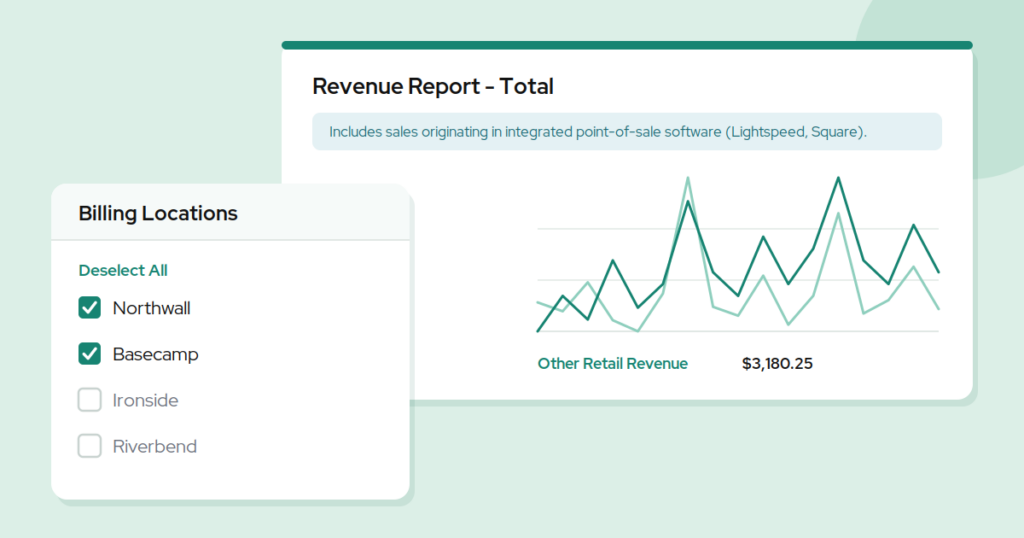
Capitan’s two February 2026 releases had one large theme and one change that stands on its own. The theme was multi-location gym reporting: across February 2 and February 16, twelve reports and customer pages gained location filters, and five gained CSV export. Separately, and regardless of how many sites you run, the Total Revenue report gained a Retail Revenue column that captures the gear and snacks sold through your point of sale, and the Memberships export picked up a Recurring Payment Method column.
Take the filters first. If you run one gym, they do not change your week. If you run three, they change how long Tuesday takes.
This was the most requested thing in our support queue, and the requests all had the same shape: the number exists, I just cannot see it for one site without rebuilding it myself.
Why totals hide the thing you need to know
A churn number for the whole organization tells you almost nothing actionable. Churn of a few percent across three locations might mean all three are drifting gently, or it might mean two are healthy and one is bleeding. Those are different problems with different answers, and the combined figure describes neither.
The usual workaround, and the state of multi-location gym reporting in most systems, is to export everything and pivot it in a spreadsheet. That works, and it is also why so many operators only look at their numbers monthly instead of weekly. Anything that takes twenty minutes to assemble gets done when there is time, which is to say rarely.
What “location” actually means depends on the question
This is the part worth slowing down on, because multi-location gym reporting gets confusing fast when a single customer touches more than one site. Every filter added in February asks you to answer it first.
A member might have signed up at your downtown gym, been billed against the account there, and now climb almost exclusively at the location that opened nearer their apartment. Which site does their membership belong to? It depends entirely on what you are asking.
Capitan now separates three answers:
- Billing location is where the membership is billed. This is the one you want for revenue, churn, freezes, and cancellations, because it follows the money.
- Home location is the site the customer is associated with. This is the one you want for headcount, demographics, and program planning, because it follows the person.
- Purchase location is where a specific transaction happened. This is the one you want for gift cards and vouchers, because it follows the sale.
Picking the wrong one produces a report that looks authoritative and answers a question you did not ask. A gym that grew by acquisition will see the largest gap between billing and home location, and those are exactly the organizations most likely to be making decisions off the numbers.
Every report that multi-location gym reporting now covers
Across the two February releases, these gained filters:
- By billing location: Memberships Set to Cancel, Memberships Set to Freeze, Membership Freeze Logs, Membership Cancellation Logs, Membership Ages, Member Churn Rate
- By home location: the Customers table, Membership Conversion Times, Customer Challenges
- By purchase location: Gift Log, Event Vouchers
- By location: Refunds
The existing Location filter on Memberships Set to Freeze is now labeled Billing Location, so the naming matches everywhere.
Five of those reports also gained CSV export: Membership Freeze Logs, Membership Cancellation Logs, the Gift Log, Event Vouchers, and Customer Challenges. Filter to one site, export, and the spreadsheet you build on top starts from the right subset instead of the whole organization.
Retail revenue, whether you run one gym or six
This next one is not a multi-location change at all. Every gym that sells chalk, tape, and energy bars has the same split, and a single-site gym feels it just as sharply. If your retail runs through Lightspeed or Square, those sales live in that system rather than in Capitan, which means the two halves of your revenue have sat in two different places.
The new Retail Revenue column captures sales on your retail platform that are not tied to a Capitan product, so gear, snacks, and chalk land in the same report as memberships and event fees. It counts from the February 2 release forward, so the history builds from there.
Two smaller changes point the same direction. The Memberships export now includes a Recurring Payment Method column showing credit card or bank transfer for each recurring membership, which is the fastest way to see how much of your revenue rides on cards that expire. And memberships sold through the Staff Site sell screen are now counted in the membership category of revenue totals alongside Climber App sales.
Also in these releases
Customers can be invited to re-join a roster they were on before, without being removed manually first. Season-based programs where the same families re-enroll cycle after cycle no longer require that step.
Upfront payment options can now carry a discount of zero, which lets you offer prepayment as a plain option at the regular monthly price rather than always bundling it with a discount.
And in the Climber App, a notice at the top of the Participant Info page tells customers that eligible discounts are applied on the following payment page. That one is aimed squarely at parents booking for their children, who tend to abandon a booking when the price they expected is not the price they see.
Start with the question, then pick the filter
Multi-location gym reporting is less about having more numbers and more about knowing which slice you are looking at. Before you open a report, decide whether you are asking about money, about people, or about a transaction. The filter follows from that, and the answer means something.
Common questions
Billing location or home location: which should I filter by?
Billing location is where the membership is billed, and it follows the money. Home location is the site the customer is associated with, and it follows the person. A member can sign up at one gym and climb at another, which is why the two are separate filters rather than one.
What if a member climbs at more than one location?
They still have one billing location and one home location, so they appear once in each view rather than being split across sites. Multi-location gym reporting counts them where the question puts them: under the site that bills them for revenue and churn, under the site they are associated with for headcount.
Which reports can be exported to CSV now?
Membership Freeze Logs, Membership Cancellation Logs, the Gift Log, Event Vouchers, and Customer Challenges all gained CSV export across the two February releases, in addition to the reports that already had it. Combined with the filters, that covers most of what multi-location gym reporting asks of a spreadsheet.
Capitan ships updates like this every two weeks, driven by what climbing gyms tell us is getting in their way. If you are running more than one site and want to see what multi-location gym reporting looks like with your own numbers in it, take a look at the platform or book a demo.
Published on 16 February 2026
Last updated on 15 September 2026
New gym in its first year? Let us help you

Continue reading
Join our community of growth-focused climbing gyms
Access roundtables with industry leaders. Share challenges. Exchange strategies. Our platform handles the heavy lifting while you leverage collective insights. Discover why leading climbing facilities choose Capitan.