
Know Which Ads Actually Sell Day Passes and Memberships
Reading Time: 4 minutes
Capitan’s September 28, 2026 release makes it easier to track gym ad conversions, adding server-side purchase tracking for Meta and Google Analytics. The same release adds automatic emails when waivers and other documents are about to expire, a new Documents report, and a set of booking and payment controls for the front desk.
It’s Monday morning and you’re reviewing last week’s Instagram campaign for day passes. Ads Manager says it drove eleven purchases. Google Analytics, with UTM tags on every link, says fourteen.
Your sales report says you sold twenty-three day passes to first-time visitors that week.
Some of those came from word of mouth. Some came from the ad. You can’t tell how many, which means you can’t tell whether the campaign paid for itself.
So you do what most gyms do: leave the budget where it is and hope.
Why gym ad conversions go missing
Most ad tracking runs in the customer’s browser. The Meta Pixel and the Google Analytics tag are small scripts that fire when someone views a page or completes a purchase. When the script fires, the ad platform hears about the sale. When it doesn’t, the sale still happens, but the ad platform never finds out.
Plenty of things stop those scripts from firing: ad blockers, content blockers on phones, and browser privacy settings that limit tracking by default. UTM tags don’t get around this. They tell Google Analytics where a visitor came from, but Analytics still relies on the same browser tag to record the purchase.
The cost isn’t only a messy report. Meta’s ad delivery learns from the purchases it can see. When some of your buyers are invisible, a campaign that’s working can look like it isn’t, and the algorithm has fewer real customers to learn from. Agencies running ads for gyms feel this most, because their reporting is only as good as the gym ad conversions reaching the platform.
Track gym ad conversions with server-side tracking
Server-side tracking sends the purchase from the system that processed it, not from the customer’s browser. With this release, Capitan sends conversion events from its own servers alongside the browser events you already have.
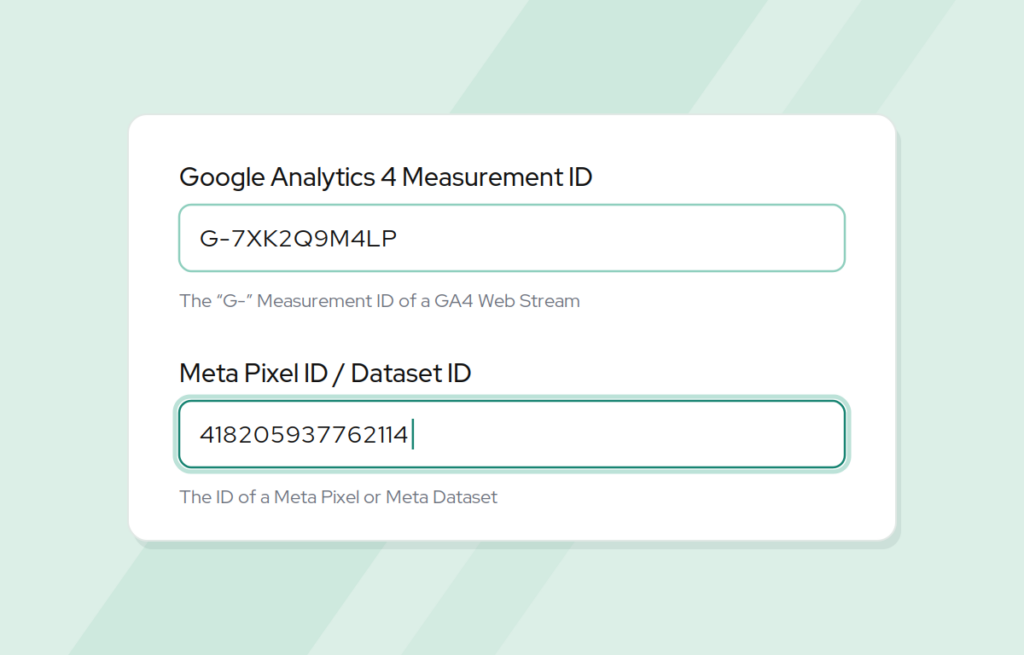
- Meta Conversions API. Enter an access token in Organization Settings and Capitan sends ViewContent, InitiateCheckout, and Purchase events through Meta’s Conversions API.
- Google Analytics. Add a Measurement Protocol API secret and Capitan reports purchases server-side through Google’s Measurement Protocol, paired with the browser events for accurate conversion counting.
Nothing changes for climbers. Checkout looks and works the same way. The difference is that a purchase no longer depends on a script surviving someone’s browser settings to be counted.
Tracking gym ad conversions in practice
Say you run a Meta campaign for an intro-to-bouldering package. A prospect taps the ad on their phone, where a content blocker is switched on, and buys the package online. The pixel never fires. Capitan sends the Purchase event from its server anyway, so Ads Manager records the sale and Meta’s delivery learns from a real buyer.
Because ViewContent and InitiateCheckout come through too, you can see where people drop off between looking at a package and paying for it. If you work with an agency, they get conversion data that lines up much more closely with what your front desk actually sold.
Automatic waiver expiration reminders
Waivers, belay certifications, and other signed documents don’t last forever. When one lapses without anyone noticing, the climber finds out at check-in and the front desk ends up handling paperwork in the middle of a busy evening.
Document templates can now send two optional emails: one before the document expires (anywhere from 1 to 365 days ahead, 14 by default) and one on the day it expires. Each has its own message and an optional button to complete the document in the Climber App, the member-facing side of Capitan. Emails go to active customers between 9 and 10 AM in your gym’s timezone, and stop once the customer completes the updated version.
A new Documents report shows one row per customer with status (Valid, Pending Staff Review, Denied, Expired, or Invalid), signature date, and expiration. Filter by upcoming expiration, export to CSV, or schedule it. A Monday email of waivers expiring in the next 30 days is a simple way to stay ahead of the desk. For more on keeping paperwork current, see how Capitan handles waivers for events and belay certification tracking.
Smaller items worth knowing
- Flexible booking deposits. Staff can set any deposit from zero to the full total when booking a customer, whatever the event’s price setup.
- Invitation deadlines. Event, roster, and waitlist invitations can expire at a specific date and time, shown in the location’s timezone.
- Hide “spots open.” Choose whether the Climber App shows remaining capacity on event listings, with overrides per event type.
- Edit Bill Date. Move an active membership’s bill date to tomorrow or later from the customer profile.
- Booking details in reports. Bookings and Reservations reports now open a full view of each transaction, participants, question responses, and linked payments.
Gym ad conversions you can trust
Ad spend is easier to defend when the numbers in Ads Manager and Google Analytics match what you actually sold. Server-side tracking gets them much closer, so you can put budget behind the campaigns that are actually filling your gym.
Common questions
Why do Facebook ads under-report sales?
The Meta Pixel runs in the customer’s browser, and ad blockers or privacy settings can stop it from firing. The sale goes through, but Meta never hears about it. The Meta Conversions API sends the purchase from the server instead, so your gym ad conversions are counted either way.
Do I need a developer to set up the Meta Conversions API?
Not in Capitan. You generate an access token in Meta and paste it into Organization Settings. For Google Analytics, you add a Measurement Protocol API secret in the same place.
Does server-side tracking replace the Meta Pixel or the Google Analytics tag?
No. It supplements them. The browser events keep running, and the server events cover purchases the browser misses.
Want to see which ads are really filling your gym? Book a demo.
Published on 29 September 2026
Last updated on 29 September 2026
New gym in its first year? Let us help you

Continue reading
Join our community of growth-focused climbing gyms
Access roundtables with industry leaders. Share challenges. Exchange strategies. Our platform handles the heavy lifting while you leverage collective insights. Discover why leading climbing facilities choose Capitan.