
How to Win Back Lapsed Members Without Discounting the Ones You Already Have
Reading Time: 5 minutes
Capitan’s January 19, 2026 release did two things at once. It gave gyms a way to win back lapsed gym members without handing the same discount to everyone else, and it tightened the connection between Capitan and Lightspeed so that sales, customers, and voided payments stay in agreement across both systems. Eight changes shipped in total, including targeted win-back offers, four improvements to the Lightspeed sync, members being able to use their own guest passes, a faster way to apply a redemption code at the desk, and two new filters on the membership reports.
Every gym runs a comeback promo eventually. Two months for the price of one, a discounted prepay, a New Year offer aimed at everyone who drifted away over the winter. The offer goes out, redemptions come in, and the numbers look good.
Then someone runs the report.
A good share of those redemptions usually came from people who never lapsed in the first place. Current members saw the offer, did the math, and moved onto a cheaper plan they were perfectly happy to pay full price for. The campaign worked. It just worked on the wrong audience. That is the structural problem with win-back offers: they are designed for one group of customers and shown to everybody.
Capitan’s January 19 release takes that decision out of the promo code and moves it into the membership itself.
Why blanket offers leak revenue
On most legacy gym systems, the only lever available is a promo code. Codes spread. They get posted in group chats, screenshotted, and handed out at the desk to whoever asks nicely. Eligibility ends up enforced by staff memory rather than by the software, and nobody finds out until the month closes.
The alternative is to stop distributing the offer and aim it. If the goal is to win back lapsed gym members, the offer should be visible to lapsed gym members and to nobody else. Instead of a code that anyone can use, the offer itself only appears for customers who meet the conditions you set.
How to win back lapsed gym members with a targeted offer
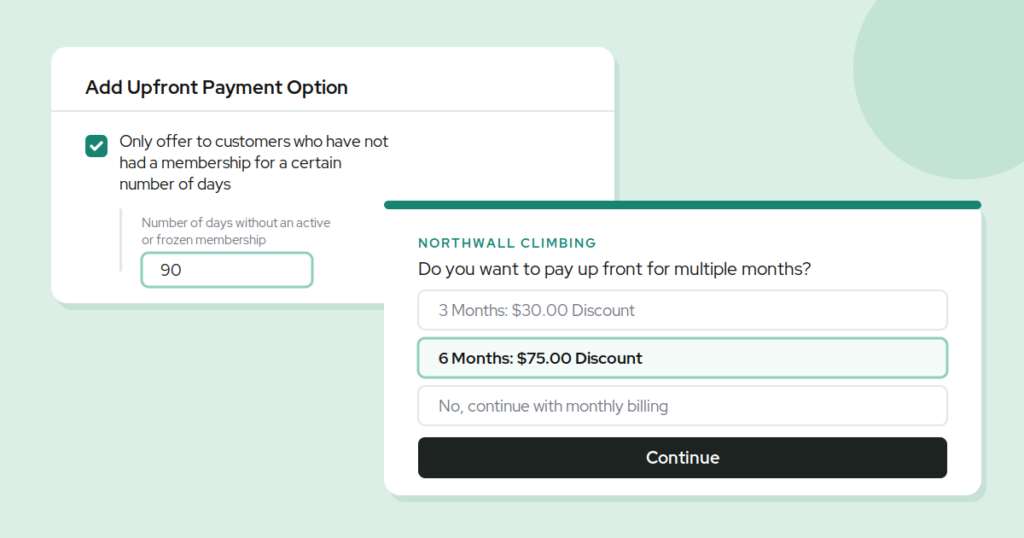
The new setting sits on Upfront Payment Options on recurring memberships, under Discount Amount: Only offer to customers who have not had a membership for a certain number of days.
Switch it on, set a number of days, and that offer is only shown in the Climber App to customers who:
- do not currently have an active membership
- do not have a frozen membership
- have not had a membership within the window you set
Everyone else simply never sees it. The discounted price exists only for lapsed gym members, so there is no code to leak and no eligibility rule for the front desk to remember.
What this looks like in practice
Say you set the window to 90 days and attach a buy-one-get-one to a six-month prepay. That is the whole mechanic for winning back lapsed gym members: a price only they can see.
A climber who cancelled in October opens the app in January and sees the offer. A member who has been paying monthly since 2023 opens the same app on the same day and sees your standard pricing. Same gym, same membership, two different prices, decided by the system rather than by whoever happens to be working the desk.
Your targeting is only as good as your customer records
Any rule that depends on membership history works off your customer records, which means those records need to be complete. A walk-in who paid at the register without a profile attached, or a family sale where the parent paid and the kids climbed, is exactly the kind of detail that decides whether an offer reaches the right person.
Most of the rest of the January 19 release went into keeping those records accurate, aimed at gyms running Lightspeed for retail and point of sale:
- Staff Site sales can be pushed to Lightspeed for payment. Start the sale at the front desk in Capitan, send it to Lightspeed for the customer to pay, and the sale closes in Capitan with line items recorded against the right customers. Retail items added at the register flow back onto the Capitan sale.
- Customer changes in Lightspeed sync back to Capitan. Reassign a sale to a different customer in Lightspeed and Capitan updates to match. For family purchases started on the Staff Site, the owner changes while the participants on each line item stay put, so you do not lose who the class was actually for.
- Anonymous Lightspeed transactions now appear in Capitan. A walk-in who pays without a profile attached no longer vanishes from your records. Attach a customer later in Lightspeed or Square and it syncs across automatically.
- Cashier attribution. Link an individual Capitan staff user to a Lightspeed user and the sales they push are attributed to them in Lightspeed reporting. Optional, and worth doing if you run commission or track desk performance.
Voided payments are handled more accurately too. When a Lightspeed payment is completed and then voided, Capitan now reflects the voided state rather than continuing to show the sale as complete.
Two reporting filters worth knowing about
The Memberships and Members reports can now be filtered by whether a membership has a payment method on file, and the Members export includes a Has payment method? column. If you have ever migrated payment processors, this is the fastest way to find members whose cards did not come across before their next bill fails.
The Memberships report can also be filtered to one specific membership type rather than just recurring or prepaid, so you can look at your standard monthly membership without staff memberships and every other recurring type mixed in.
Ship it, then measure it
Trying to win back lapsed gym members is a pricing decision, not a marketing one. The question is not how loudly you advertise the offer. It is whether the offer reaches the people whose behavior you are trying to change and stays away from the people who were already paying.
Common questions
Will current members see the win-back offer?
No. Customers with an active or frozen membership are excluded, as is anyone who has held a membership inside the window you set, so the offer stays limited to lapsed gym members. The offer is not a code that can be shared or applied at the desk, so there is nothing to leak.
How many days should the window be?
That depends on how your cancellations cluster. Long enough that someone who cancelled last week is not rewarded for it, short enough to reach lapsed gym members while they still think of your gym as theirs. Pick a number, run it for a season, and change it once you can see who came back.
Can it be combined with other membership discounts?
Yes. It works alongside the existing minimum-days-without-a-membership discount, so you can build a ladder: a modest offer for someone who lapsed last month, something more generous for someone who has been gone a year.
Capitan ships updates like this every two weeks, driven by what climbing gyms tell us is getting in their way. If you want to see how targeted offers, membership automation, and your point of sale fit together for your gym, book a demo and we will walk you through it with your numbers.
Published on 19 January 2026
Last updated on 15 September 2026
New gym in its first year? Let us help you

Continue reading
Join our community of growth-focused climbing gyms
Access roundtables with industry leaders. Share challenges. Exchange strategies. Our platform handles the heavy lifting while you leverage collective insights. Discover why leading climbing facilities choose Capitan.