
Group Your Memberships Around Who Is Buying
Reading Time: 4 minutes
Capitan’s March 16, 2026 release introduces Membership Categories, a way to group your gym membership tiers into sets that customers can filter and that each carry their own link. The same release adds Copy from Above Participant buttons to the documents flow in the Climber App, a bulk Add Alert action on the Customers table, and a run of smaller changes across event reservations and payments.
Someone comes in for the first time, climbs, likes it, and comes back to the desk. Which one is the normal one?
It is the most common question your front desk gets, and it has no short answer. The normal one depends on whether they are coming twice a week or twice a month, whether they are a student, and whether the intro package still applies.
So your staff talk them through it. Every time.
Membership lists grow faster than they get read
A gym open a few years usually ends up with a dozen or more climbing gym membership options. Adult, student, youth, off-peak, household, punch cards, an intro package, a legacy rate three people are still on. Each was the right thing to add at the time. Collectively, they ask a newcomer to rule out eleven options before finding the two that suit, which nobody does carefully on a phone.
Most gyms handle it one of three ways. They link the full catalog and trust people to scroll. They describe the options on their own website, which works until pricing moves and the page goes stale. Or the front desk answers one conversation at a time, which does not scale. None of those is wrong, but each is a step between deciding to join and joining, and every step there costs some of them.
Membership Categories give gym membership tiers a shape customers can read
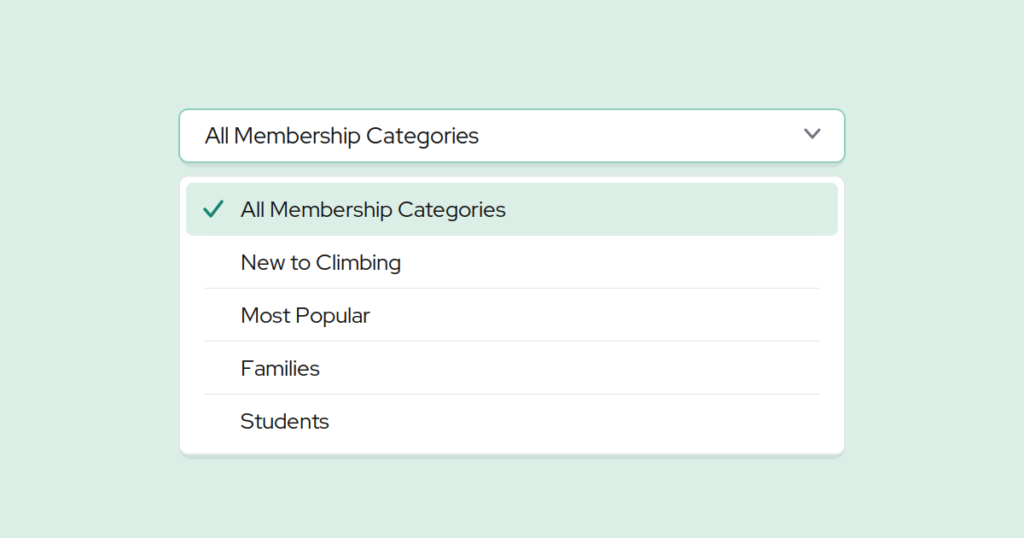
Organizations can now group membership types into categories. A category filters in the Climber App, the member-facing side of Capitan, so a customer sees only the memberships inside it, and each category has its own unique URL.
The useful part is that a category can be built around whoever you are talking to rather than around how your pricing works internally. A few that earn their place:
- New to Climbing: the intro package, the first-timer rate, and the punch card, so a beginner is not weighing them against an off-peak annual.
- Most Popular: the two or three memberships most people actually buy, which answers the desk question before it is asked.
- Family: household rates and youth options together.
- Students: for the email you send at the start of term.
Each has its own URL, so a page on your website can link straight into one set and a campaign can point at exactly the memberships suiting the people reading it. The list your customer lands on is the live one, so it moves when your pricing does. Categories are managed in Memberships & Passes under Categories on the Staff Site, the front-desk side of Capitan, and that settings area now links to your membership catalog too.
What this looks like in practice
Say you group fourteen membership types into four categories. The first-timer gets pointed at New to Climbing and sees three options instead of fourteen. A parent asking what a family of four needs gets a link to Family. The start-of-term email links to Students. As with winning back lapsed members, the idea is to show people the subset that fits rather than the whole menu.
Family membership signup, once they say yes
The family case is worth following a step further, because the work continues after the purchase. Digital waivers for families have a particular shape: the participants share a phone number, an address, and an emergency contact, and under most gyms’ policies a parent or guardian completes each minor’s paperwork themselves. So one person types the same three fields four times, on a phone, in a lobby.
This release adds Copy from Above Participant buttons next to the phone number, address, and emergency contact fields when someone completes documents for multiple participants in the Climber App. Tapping one carries the value down from the participant above, so the second, third, and fourth sets of forms get much shorter while details that genuinely differ still get entered deliberately.
Also in this release
- Add Alert as a bulk action. Select a group of customers and add an alert to each profile in one step. Alerts are removed individually, so choose deliberately.
- Filter by profile picture. Gyms using profile pictures for identification at check-in can find members who have not uploaded one.
- Cancellation emails for rolling events. Cancelling one occurrence sends the notice to the participant and booking customer addresses as well as the reservation’s own, using the owner’s address for rolling memberships where the participant has none.
- Square line items show individual amounts. Each line item in the payment modal displays its own amount. Capitan integrates with retail platforms rather than running retail itself, through Square and Lightspeed.
What ties it together
Your gym membership tiers exist because your customers are not all the same, and categories let the list say so. Copy from Above Participant keeps the momentum once someone has chosen. Both sit on the stretch where an interested person works out how much effort joining will take.
Common questions
How to structure gym memberships into categories
Create a category in Memberships & Passes under Categories on the Staff Site, then assign membership types to it. A list usually groups well by who is buying rather than by price. The category is immediately filterable in the Climber App and has its own URL.
Can one parent complete documents for several children?
Yes. When documents are completed for multiple participants in the Climber App, Copy from Above Participant buttons appear next to the phone number, address, and emergency contact fields, carrying each value down from the participant above.
Can I link to one membership category from my website?
Yes. Each category has a unique URL, so a page or an email can point at one set of memberships rather than the full catalog. See the features page for the rest of what the Climber App handles.
Want to see this working for your gym? Book a demo.
Published on 16 March 2026
Last updated on 15 September 2026
New gym in its first year? Let us help you

Continue reading
Join our community of growth-focused climbing gyms
Access roundtables with industry leaders. Share challenges. Exchange strategies. Our platform handles the heavy lifting while you leverage collective insights. Discover why leading climbing facilities choose Capitan.